This article shows how to create an OpenSSL CA on a Windows 7 machine (using the OpenSSL Windows binaries) and request SSL, Code-Signing and Multi-purpose Certificates from the CA for use within a test / development environment.
Background
Having the functionality to issue certificates quickly and without the need for an official Enterprise CA is something nice to have at your finger tips. A great deal of my work involves creating test web services and clients that require SSL certificates and occasionally Code Signing.
In the WS Federation / Windows Identity Framework world for example, token encryption is a mandatory requirement of the WIF framework when working with Active Clients.
It worth noting, there are other methods to issue certificates (e.g. self-sign, makecert etc.) but OpenSSL has some nice features and is very easy to setup and use within a dev environment.
Install OpenSSL
To install OpenSSL on a Windows machine download the binaries from http://www.openssl.org/ (I got the Win32 OpenSSL v1.0.0g Light copy from here : http://www.slproweb.com/products/Win32OpenSSL.html).
Install the package with the default options; once complete the location of the required files will be in C:\OpenSSL-Win32
Create Command Files
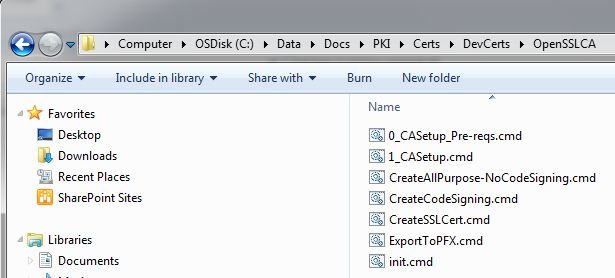
Create a directory in which to deploy all the required batch files. In my case, I created a directory called C:\Data\Docs\PKI\Certs\DevCerts\OpenSSLCA. Within this directory create the following files:
Note: To save you some time, I’ve added a downloadable set of .cmd files to establish and run your CA. Once you downloaded them, extract to a directory and follow the instructions from Setup Your Root CA onwards.
- init.cmd
@Echo off
SET BINDIR="C:\OpenSSL-Win32\bin"
SET CANAME=SilkSpunDevCA1
Adjust the BINDIR and CANAME variables as you like.
BINDIR should point to the location where openssl.exe is installed.
CANAME will be a directory created under BINDIR that will act as the CA. -
0_CASetup_Pre-reqs.cmd
@ECHO OFF

if not exist %~dp0init.cmd (
    Echo Expected file '%~dp0init.cmd' does not exist
    Echo Ensure this file exists and sets two environment variables, e.g.
    Echo.
    Echo SET BINDIR="C:\OpenSSL-Win32\bin"
    Echo SET CANAME=SilkSpunDevCA1
    goto :eof
)

call %~dp0init.cmd

if not exist %BINDIR% (
    Echo Expected path does not exist : '%BINDIR%'
    Echo Set the BINDIR variable to the path containing the openssl.exe
    goto :eof
)

cd %BINDIR%

IF NOT EXIST %CANAME% MD %CANAME%
IF NOT EXIST %CANAME%\Private MD %CANAME%\Private
IF NOT EXIST %CANAME%\Certs MD %CANAME%\Certs
IF NOT EXIST %CANAME%\NewCerts MD %CANAME%\NewCerts
IF NOT EXIST %CANAME%\Requests MD %CANAME%\Requests
IF NOT EXIST %CANAME%\PFX MD %CANAME%\PFX

IF NOT EXIST %CANAME%\INDEX.TXT echo. 2>%CANAME%\index.txt
IF NOT EXIST %CANAME%\SERIAL echo 1000>%CANAME%\serial -
1_CASetup.cmd
@ECHO OFF

if not exist %~dp0init.cmd (
    Echo Expected file '%~dp0init.cmd' does not exist
    Echo Ensure this file exists and sets two environment variables, e.g.
    Echo.
    Echo SET BINDIR="C:\OpenSSL-Win32\bin"
    Echo SET CANAME=SilkSpunDevCA1
    goto :eof
)

call %~dp0init.cmd

if not exist %BINDIR% (
    Echo Expected path does not exist : '%BINDIR%'
    Echo Set the BINDIR variable to the path containing the openssl.exe
    goto :eof
)

cd %BINDIR%

openssl.exe req -new -x509 -days 3650 -extensions v3_ca -keyout "%CANAME%\Private\cakey.pem" -out "%CANAME%\cacert.pem" -config "%CANAME%\openssl.cfg" -
CreateSSLCert.cmd
@ECHO OFF

SET CERTNAME=%1

if "%CERTNAME%"=="" (
    Echo You must specify the name of the Certificate
    goto :eof
)

if not exist %~dp0init.cmd (
    Echo Expected file '%~dp0init.cmd' does not exist
    Echo Ensure this file exists and sets two environment variables, e.g.
    Echo.
    Echo SET BINDIR="C:\OpenSSL-Win32\bin"
    Echo SET CANAME=SilkSpunDevCA1
    goto :eof
)

call %~dp0init.cmd

if not exist %BINDIR% (
    Echo Expected path does not exist : '%BINDIR%'
    Echo Set the BINDIR variable to the path containing the openssl.exe
    goto :eof
)

CD %BINDIR%

if not exist OpenSSL.exe (
    Echo Cannot Find OpenSSL.exe within '%BINDIR%'
    goto :eof
)

if not exist %CANAME%\openssl.cfg (
    Echo Cannot find openssl configuration file within '%BINDIR%\%CANAME%\openssl.cfg'
    goto :eof
)

OpenSsl genrsa -out "%CANAME%\private\%CERTNAME%-key.key" -des3 4096
OpenSsl req -new -key "%CANAME%\private\%CERTNAME%-key.key" -out "%CANAME%\requests\%CERTNAME%-req.csr" -config "%CANAME%\openssl.cfg"

REM Sign and Issue
OpenSsl x509 -req -days 365 -in "%CANAME%\requests\%CERTNAME%-req.csr" -CA "%CANAME%\cacert.pem" -setalias %CERTNAME% -CAcreateserial -CAkey "%CANAME%\Private\cakey.pem" -out "%CANAME%\certs\%CERTNAME%-key.pem" -extfile "%CANAME%\openssl.cfg" -extensions ssl_cert
OpenSsl pkcs12 -export -out "%CANAME%\PFX\%CERTNAME%.pfx" -inkey "%CANAME%\private\%CERTNAME%-key.key" -in "%CANAME%\certs\%CERTNAME%-key.pem" -
CreateCodeSigning.cmd
@ECHO OFF

SET CERTNAME=%1

if "%CERTNAME%"=="" (
    Echo You must specify the name of the Certificate
    goto :eof
)


if not exist %~dp0init.cmd (
    Echo Expected file '%~dp0init.cmd' does not exist
    Echo Ensure this file exists and sets two environment variables, e.g.
    Echo.
    Echo SET BINDIR="C:\OpenSSL-Win32\bin"
    Echo SET CANAME=SilkSpunDevCA1
    goto :eof
)

call %~dp0init.cmd

if not exist %BINDIR% (
    Echo Expected path does not exist : '%BINDIR%'
    Echo Set the BINDIR variable to the path containing the openssl.exe
    goto :eof
)

CD %BINDIR%

if not exist OpenSSL.exe (
    Echo Cannot Find OpenSSL.exe within '%BINDIR%'
    goto :eof
)

if not exist %CANAME%\openssl.cfg (
    Echo Cannot find openssl configuration file within '%BINDIR%\%CANAME%\openssl.cfg'
    goto :eof
)

OpenSsl genrsa -out "%CANAME%\private\%CERTNAME%-key.key" -des3 4096
OpenSsl req -new -key "%CANAME%\private\%CERTNAME%-key.key" -out "%CANAME%\requests\%CERTNAME%-req.csr" -config "%CANAME%\openssl.cfg"

REM Sign and Issue
OpenSsl x509 -req -days 365 -in "%CANAME%\requests\%CERTNAME%-req.csr" -CA "%CANAME%\cacert.pem" -setalias %CERTNAME% -CAcreateserial -CAkey "%CANAME%\Private\cakey.pem" -out "%CANAME%\certs\%CERTNAME%-key.pem" -extfile "%CANAME%\openssl.cfg" -extensions ssl_cert
OpenSsl pkcs12 -export -out "%CANAME%\PFX\%CERTNAME%.pfx" -inkey "%CANAME%\private\%CERTNAME%-key.key" -in "%CANAME%\certs\%CERTNAME%-key.pem"


OpenSsl genrsa -out "%CANAME%\private\%CERTNAME%-key.key" -des3 4096
OpenSsl req -new -key "%CANAME%\private\%CERTNAME%-key.key" -out "%CANAME%\requests\%CERTNAME%-req.csr" -config "%CANAME%\openssl.cfg"

REM Sign and Issue
OpenSsl x509 -req -days 365 -in "%CANAME%\requests\%CERTNAME%-req.csr" -CA "%CANAME%\cacert.pem" -setalias %CERTNAME% -CAcreateserial -CAkey "%CANAME%\Private\cakey.pem" -out "%CANAME%\certs\%CERTNAME%-key.pem" -extfile "%CANAME%\openssl.cfg" -extensions code_sign
OpenSsl pkcs12 -export -out "%CANAME%\PFX\%CERTNAME%.pfx" -inkey "%CANAME%\private\%CERTNAME%-key.key" -in "%CANAME%\certs\%CERTNAME%-key.pem" -
CreateAllPurpose-NoCodeSigning.cmd
@ECHO OFF

SET CERTNAME=%1

if "%CERTNAME%"=="" (
    Echo You must specify the name of the Certificate
    goto :eof
)

if not exist %~dp0init.cmd (
    Echo Expected file '%~dp0init.cmd' does not exist
    Echo Ensure this file exists and sets two environment variables, e.g.
    Echo.
    Echo SET BINDIR="C:\OpenSSL-Win32\bin"
    Echo SET CANAME=SilkSpunDevCA1
    goto :eof
)

call %~dp0init.cmd

if not exist %BINDIR% (
    Echo Expected path does not exist : '%BINDIR%'
    Echo Set the BINDIR variable to the path containing the openssl.exe
    goto :eof
)

CD %BINDIR%

if not exist OpenSSL.exe (
    Echo Cannot Find OpenSSL.exe within '%BINDIR%'
    goto :eof
)

if not exist %CANAME%\openssl.cfg (
    Echo Cannot find openssl configuration file within '%BINDIR%\%CANAME%\openssl.cfg'
    goto :eof
)

Rem Create Request
openssl req -new -nodes -out "%CANAME%\requests\%CERTNAME%-req.pem" -keyout "%CANAME%\private\%CERTNAME%-key.pem" -config "%CANAME%\openssl.cfg"

Rem Issue
openssl ca -config "%CANAME%\openssl.cfg" -out "%CANAME%\certs\%CERTNAME%-cert.pem" -infiles "%CANAME%\requests\%CERTNAME%-req.pem"

Rem Export to PFX
openssl pkcs12 -export -in "%CANAME%\Certs\%CERTNAME%-cert.pem" -inkey "%CANAME%\private\%CERTNAME%-key.pem" -out "%CANAME%\pfx\%CERTNAME%.pfx" -certfile "%CANAME%\cacert.pem"
The results of which should look something like this:
Setup the Root CA
By running the scripts just created, it is nice and easy to setup a new CA.
- Run the file 0_CASetup_Pre-reqs.cmd you just created from the Command Prompt. The results should look something like this:

- Download the file openssl.cfg here and place it in the Bin/SilkSpunDevCA1 directory (or whatever you decided to call your CA).
- Replace all instances of ./demoCA with ./SilkSpunDevCA1 (or whatever you decided to call your CA)
-
Optional but recommended (to make life easier) you can add some default values (just search for any string ending in _default):
countryName_default = CH
stateOrProvinceName_default = "Basel-Stadt"
0.organizationName_default = "Silkspun Organization"
-
Run the file 1_CASetup.cmd you just created from the Command Prompt.
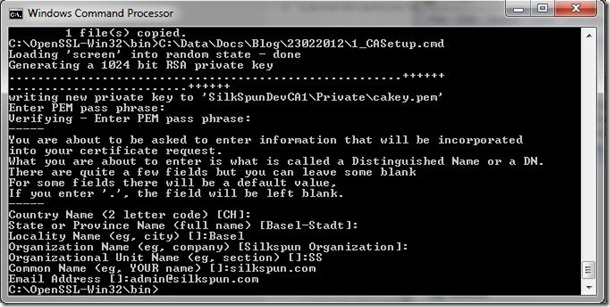
Note: You will be prompted to enter a pass phrase (don’t forget this!) and some additional information about the CA. Complete this as required (the important field is the Organization Name, which must be the same across all issued certificates from this CA).
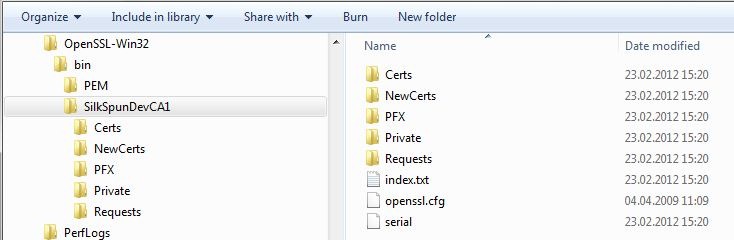
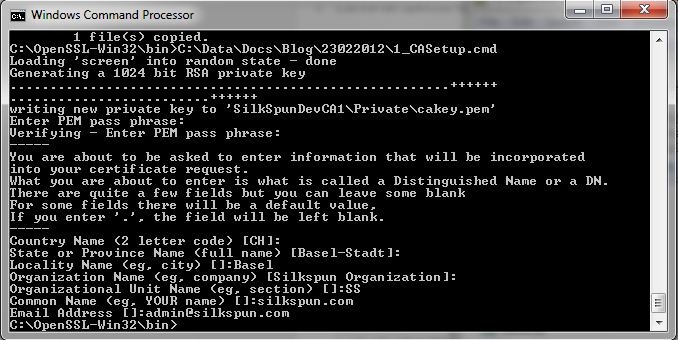
Now we have a running CA. Lets issue an SSL Cert.
Requesting an SSL Certificate
- Open a Command Prompt with the option to RunAs Administrator (not an absolute requirement, but will not result in errors such as: ‘unable to write ‘random state’’
- Run CreateSSLCert.cmd <CertificateName> (CertificateName is the name of the req, key and pem files created by the process within the CA).
- Here we are prompted again for some information to be saved to the issued certificate. Common Name in this case should match the Web Sites URL. The process prompts for several passwords along the way.
C:\OpenSSL-Win32\bin>"C:\Data\Docs\PKI\Certs\DevCerts\OpenSSLCA\CreateSSLCert.cm
d" mywebsite.silkspun.com
Loading 'screen' into random state - done
Generating RSA private key, 4096 bit long modulus
................................................................................
...............................................++
................................................................................
................................................................................
................................................................................
.........++
e is 65537 (0x10001)
Enter pass phrase for SilkSpunDevCA1\private\mywebsite.silkspun.com-key.key:
Verifying - Enter pass phrase for SilkSpunDevCA1\private\mywebsite.silkspun.com-
key.key:
Verify failure
User interface error
9384:error:0906906F:PEM routines:PEM_ASN1_write_bio:read key:.\crypto\pem\pem_li
b.c:382:
unable to load Private Key
7452:error:0906D06C:PEM routines:PEM_read_bio:no start line:.\crypto\pem\pem_lib
.c:696:Expecting: ANY PRIVATE KEY
Loading 'screen' into random state - done
SilkSpunDevCA1\requests\mywebsite.silkspun.com-req.csr: No such file or director
y
Loading 'screen' into random state - done
Error opening input file SilkSpunDevCA1\certs\mywebsite.silkspun.com-key.pem
SilkSpunDevCA1\certs\mywebsite.silkspun.com-key.pem: No such file or directory

C:\OpenSSL-Win32\bin>"C:\Data\Docs\PKI\Certs\DevCerts\OpenSSLCA\CreateSSLCert.cm
d" mywebsite.silkspun.com
Loading 'screen' into random state - done
Generating RSA private key, 4096 bit long modulus
.......................................................++
...................................++
e is 65537 (0x10001)
Enter pass phrase for SilkSpunDevCA1\private\mywebsite.silkspun.com-key.key:
Verifying - Enter pass phrase for SilkSpunDevCA1\private\mywebsite.silkspun.com-
key.key:
Enter pass phrase for SilkSpunDevCA1\private\mywebsite.silkspun.com-key.key:
Loading 'screen' into random state - done
You are about to be asked to enter information that will be incorporated
into your certificate request.
What you are about to enter is what is called a Distinguished Name or a DN.
There are quite a few fields but you can leave some blank
For some fields there will be a default value,
If you enter '.', the field will be left blank.
-----
Country Name (2 letter code) [CH]:
State or Province Name (full name) [Basel-Stadt]:
Locality Name (eg, city) []:.
Organization Name (eg, company) [Silkspun Organization]:
Organizational Unit Name (eg, section) []:.
Common Name (eg, YOUR name) []:mywebsite.silkspun.com
Email Address []:admin@silkspun.com

Please enter the following 'extra' attributes
to be sent with your certificate request
A challenge password []:silkspun
An optional company name []:silkspun
Loading 'screen' into random state - done
Signature ok
subject=/C=CH/ST=Basel-Stadt/O=Silkspun Organization/CN=mywebsite.silkspun.com/e
mailAddress=admin@silkspun.com
Getting CA Private Key
Enter pass phrase for SilkSpunDevCA1\Private\cakey.pem:
Loading 'screen' into random state - done
Enter pass phrase for SilkSpunDevCA1\private\mywebsite.silkspun.com-key.key:
Enter Export Password:
Verifying - Enter Export Password:

C:\OpenSSL-Win32\bin>
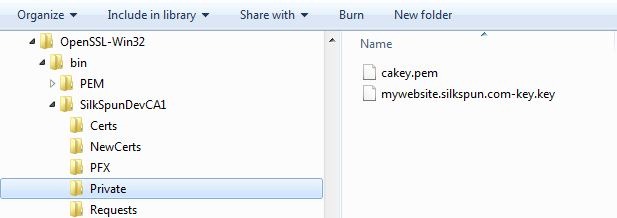
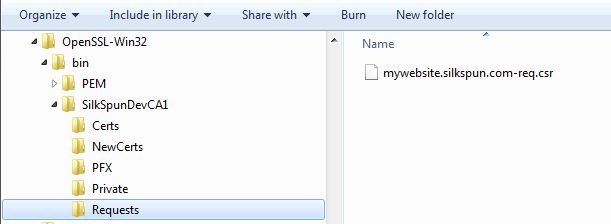
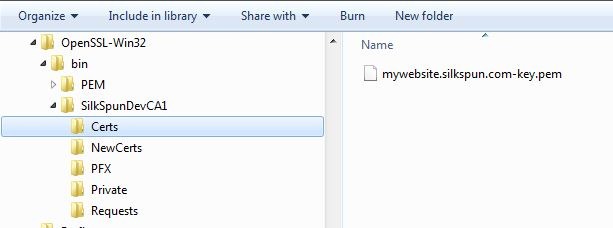
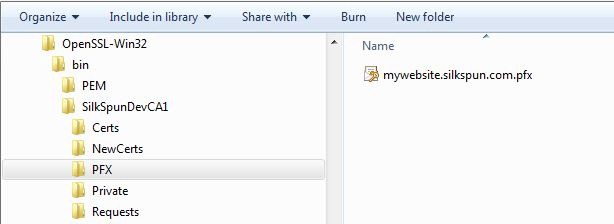
The result of running this command file is the creation of four files consisting of a request file, a private key, a certificate and a PFX file:

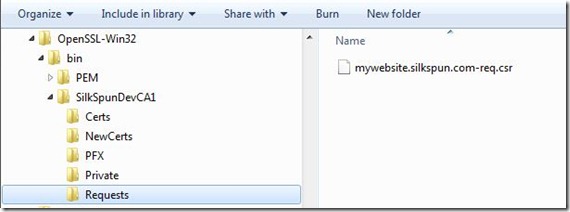
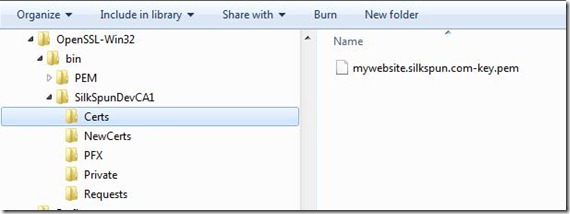
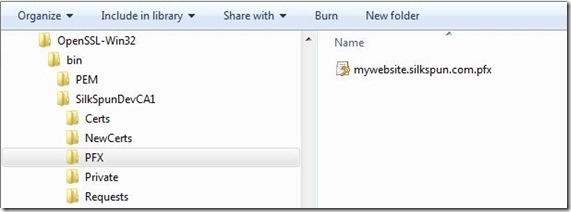
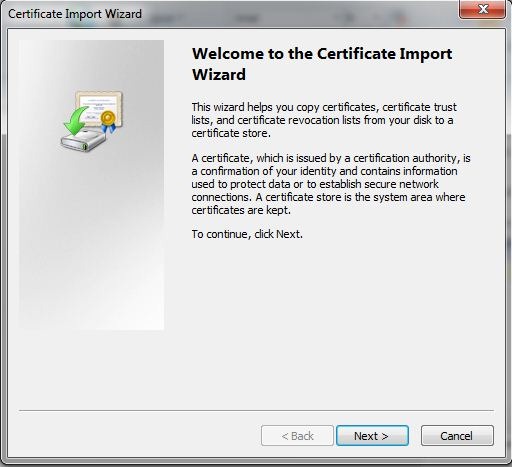
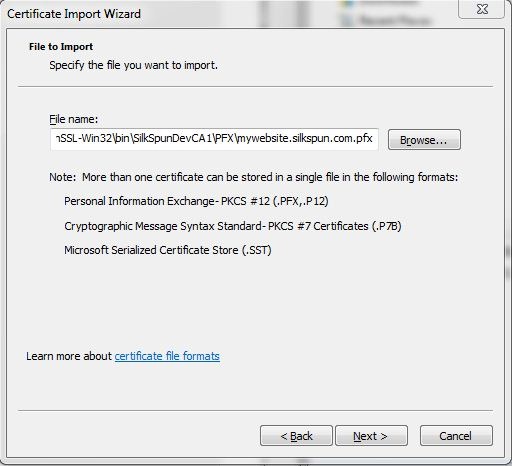
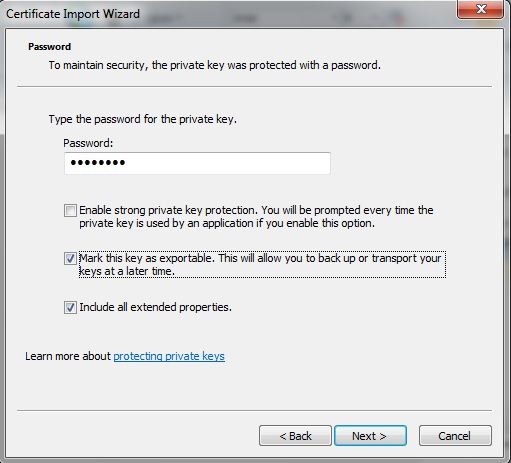
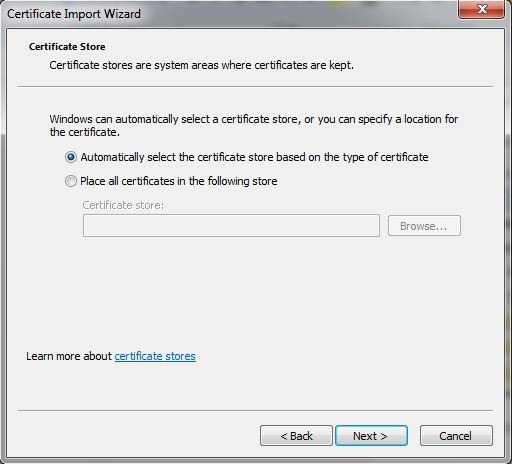
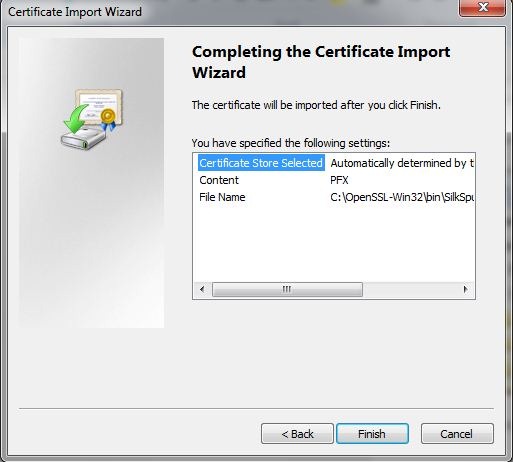
- To import this to the Windows Certificate Store, double-click the file and follow the import Wizard
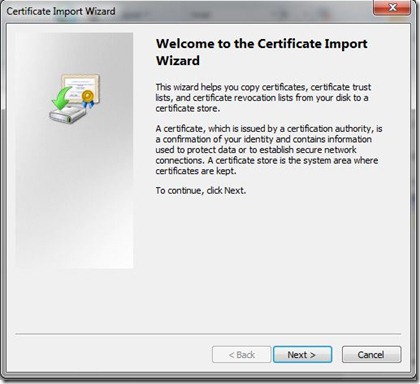
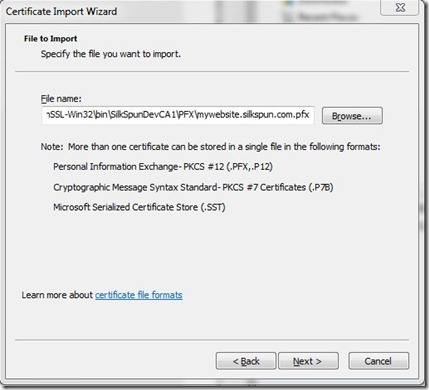
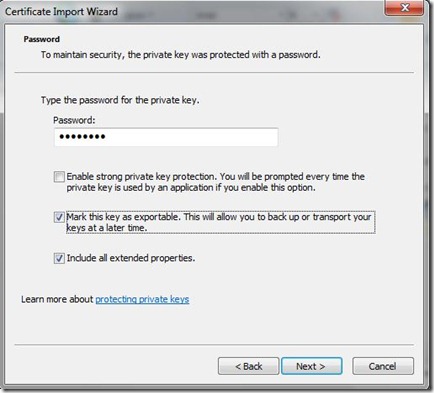
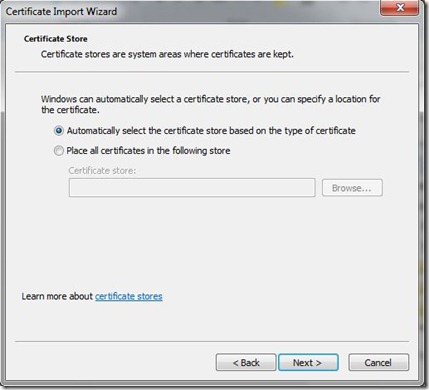
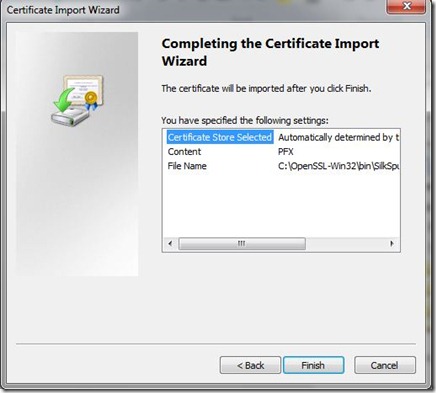
Once the import has completed, you should find the CA Certificate has been added to the Trusted Root Certificate Authorities and the Web Server (SSL) Certificate has been added to the Personal store.
Code Signing and No Code Signing
There are two other cmd files included (that were created as part of the initial process). They can be used in exactly the same way as CreateSSLCert.cmd however they generate Code Signing and All Purpose certificates. I will cover Code Signing in another blog entry soon.
-
CreateCodeSigning.cmd
-
CreateAllPurpose-NoCodeSigning.cmd
- For example, after running each Create* Command File, and importing to the MY store of my user, this is what CertMgr is displaying;

Hope this will help you out in the future.
Further Reading
Creating a CA with OpenSSL
http://www.freebsdmadeeasy.com/tutorials/freebsd/create-a-ca-with-openssl.php
Create SSL Certs with OpenSSL
http://www.freebsdmadeeasy.com/tutorials/web-server/apache-ssl-certs.php
SSL Format Conversion
https://www.sslshopper.com/ssl-converter.html

 SILK SPUN
Leave a comment